NEWSIGNAL · Asking for vendorsICP 94 · Hot
Vikram DesaiCEO at Desai Precision Components
We are evaluating MES vendors for our Pune plant this quarter. Any recommendations?
Built for LinkedIn users who don’t like clutter. GoldPan sorts your feed into tabs you make, clears out the ads, bait and game invites, and points out the buyers worth talking to.
A 41-second film. LinkedIn shows ads, game scores, invites and “X likes this” spillover. With GoldPan switched on, ads and puzzle games are gone and spillover is muted. Buying signals are tagged as leads. Nuggets let you press G to grab a line or the text inside an image, with who said it attached, then tag it, recall it and quote it with credit. It all runs on your device, and GoldPan is free forever.
GoldPan for LinkedIn is a free Chrome extension by Amit Jadhav. It adds your own tabs to the LinkedIn feed, hides promoted posts, engagement bait and game invites, runs your #hashtag searches across all of LinkedIn, tags buying signals and scores every author against your ideal buyer. It has no servers: everything it reads and saves stays on your device, and it never posts, likes, comments or messages for you.
LinkedIn lets you unfollow people, but there’s no way to hide posts by word or topic. GoldPan adds that, plus tabs, so a ten-minute scroll gets you somewhere.
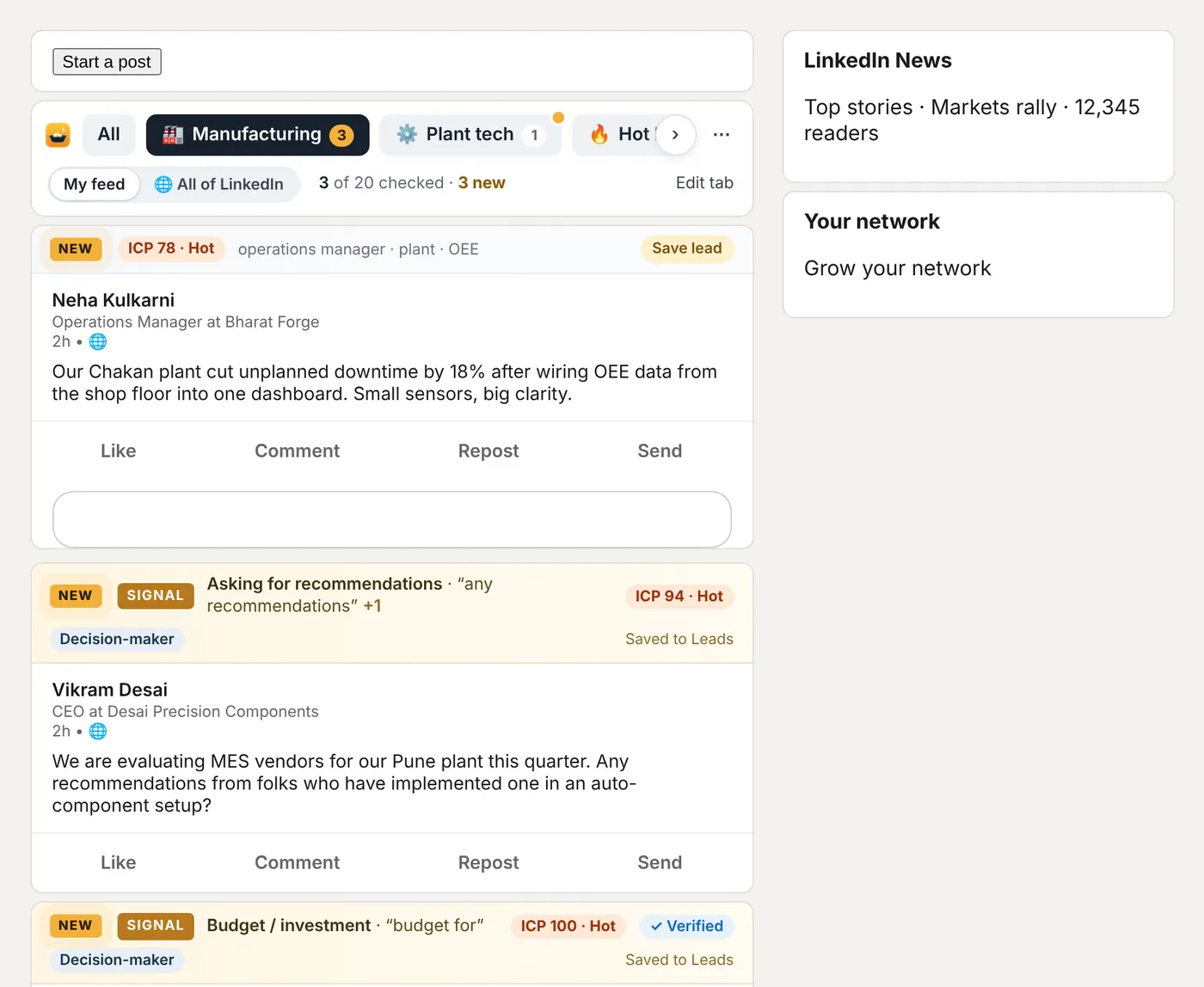
Like the topic chips on YouTube, sitting on top of your LinkedIn feed. Make a tab for AI, Manufacturing, Hiring or your clients, and one click shows only those posts.

We are evaluating MES vendors for our Pune plant this quarter. Any recommendations?
We replaced three tools with one AI agent for invoice matching. Here’s what broke first.
We have set aside budget for an MES rollout in Q1 across our forging lines.
Our Chakan plant cut unplanned downtime by 18% after wiring OEE data into one dashboard.
Defect escapes fell to zero for six weeks after we moved AI inspection onto the line.
Your feed only shows your network. Switch any tab to All of LinkedIn and GoldPan opens LinkedIn’s own post search for it, newest first, as if you had typed it yourself. Then it cleans and scores what comes back.
Describe who you sell to once. From then on, every post author and every profile you open gets a 0–100 ideal-buyer score, and posts with buying intent get a gold tag.
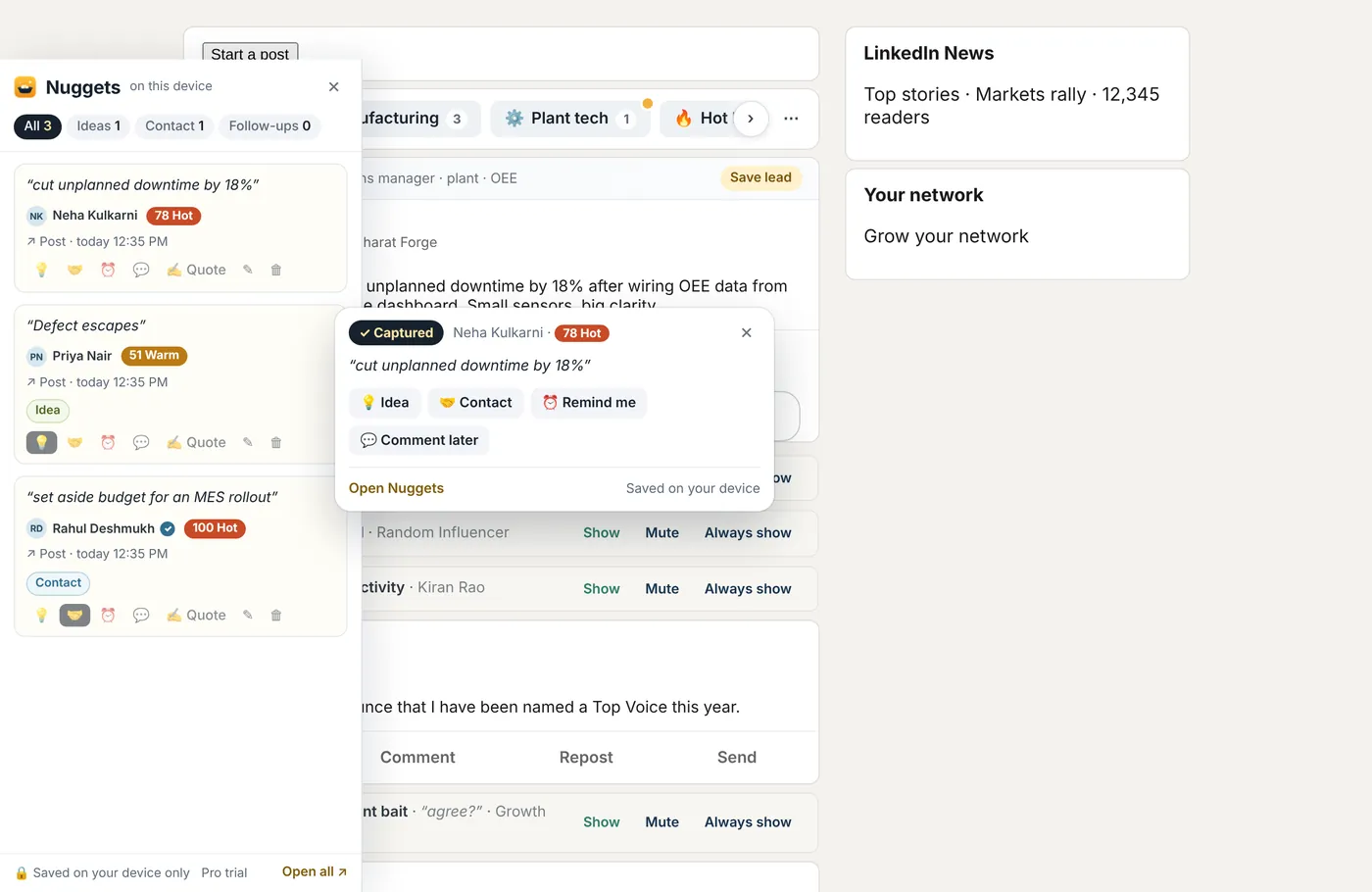
Press G over a post and drag across a line, an image or a carousel slide. GoldPan saves it in a side panel with who said it, their profile and post links, the time and their buyer score. Words inside images are read on your device.
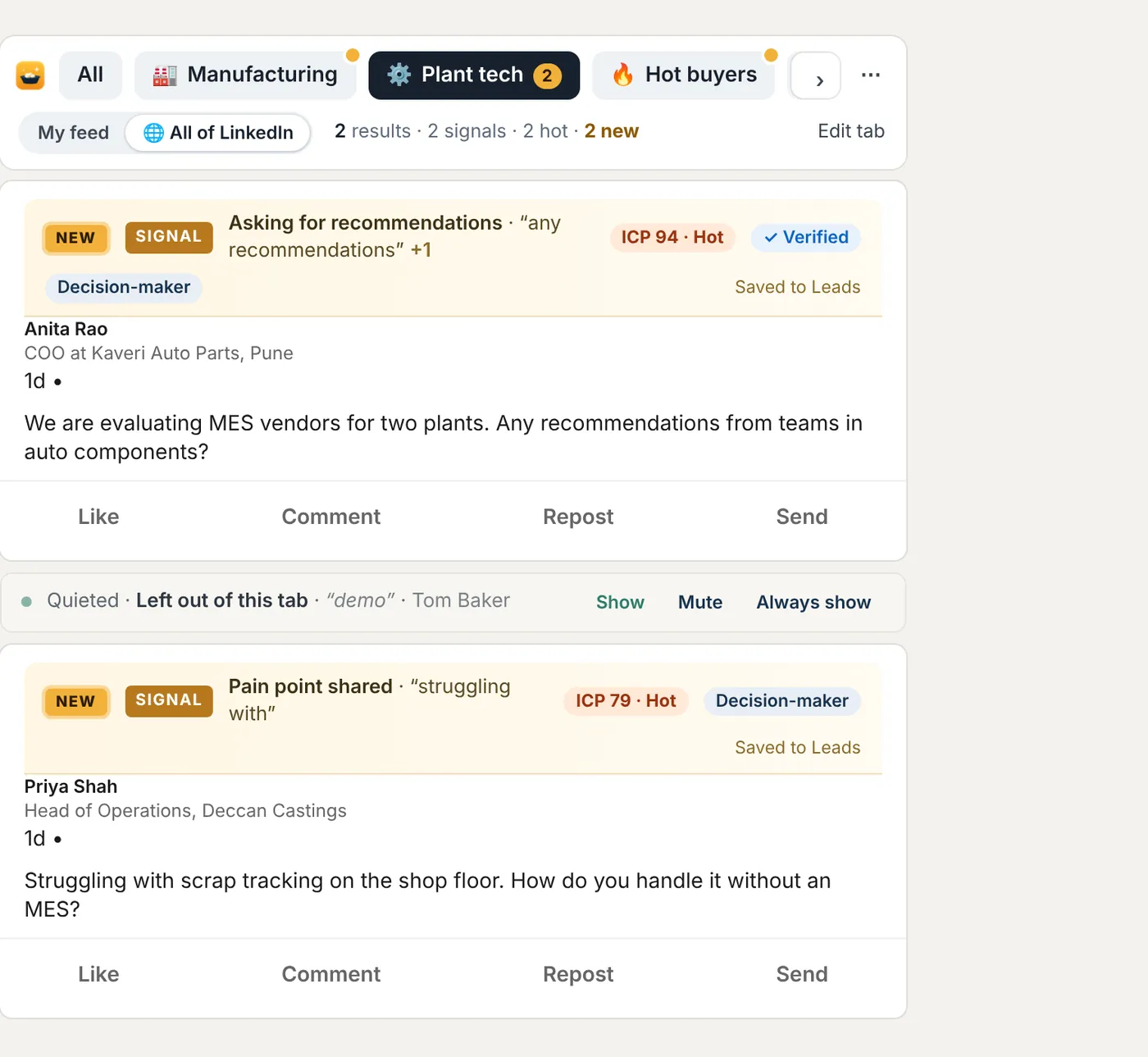
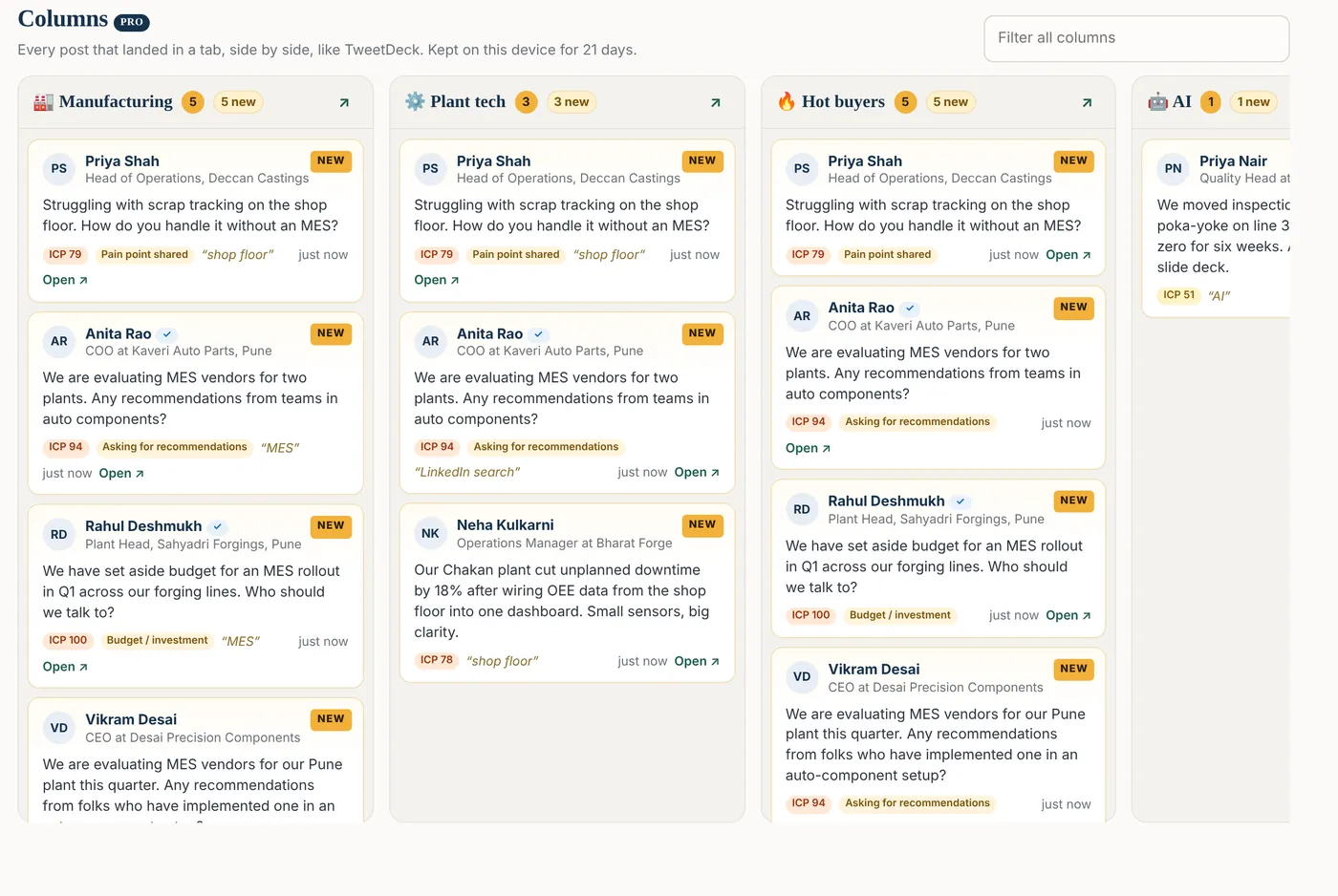
Like TweetDeck, for LinkedIn. The columns page shows each tab as a column, with everything it found in your feed and across all of LinkedIn, newest first.
Mute the author, always show them, hide just this post or save it, right where you’re reading.
Engagement bait, humblebrags, hustle stories, AI-written hooks, politics and puzzle games. Add or remove phrases.
Checks your draft for weak hooks, AI-sounding phrases and engagement bait before you post.
Save posts, then ask questions of them in plain words. Pro sends them to Claude or NotebookLM in one click.
The hot ideal buyers who posted today, in one list. Free shows the top 3.
What your feed talked about this week, how much noise was quieted and which signals came up.
“Only manufacturing, AI and ERP.” Say what you want to see and the rest folds away. Focus mode caps the scroll.
Package your ideal buyer, tabs and rules into one file the whole sales team can load.
Zip, Queens and Tango invites stop showing up in your Notifications tab.
One click from the Chrome Web Store. No sign-up, no card, nothing to connect.
Promoted posts, “X likes this” spillover and game invites are quieted straight away. The tab bar appears above your feed.
Pick a starter tab or type your own words and #hashtags. Describe your ideal buyer when you’re ready. Pro is on for your first 7 days.
Most people never need more than the free plan. Every install gets Pro free for 7 days, so you can see what it adds before you decide.
No account, no card, no time limit.
Pay once. No subscription. Keep every Pro feature for life.
Detected region: International ($9 · Stripe)
Your licence key is emailed to you within 12 hours of payment. Paste it in GoldPan’s dashboard under Pro. Payments are processed securely by ModelCam Technologies, the company behind Amit Jadhav’s tools, so your receipt and statement will show “ModelCam Technologies”. Team of 5 or more? Email us for a bulk key pack.
| Feature | Free | Pro |
|---|---|---|
| Feed tabs | 3 | Unlimited, plus people and smart tabs |
| All of LinkedIn and Signal Searches | 5 a month | Unlimited |
| Columns page | — | Yes |
| Noise filters and topic packs | Yes | Plus six more packs, intent filter, Focus mode |
| Signal tags, ideal-buyer score, Verified tag | Yes | Yes, with custom signal phrases |
| Saved leads | 5 a month | Unlimited, saved automatically, CSV export |
| Nuggets | 20 a month, Idea and Contact tags, profile recall | Unlimited, reminders, morning brief, nudges, export |
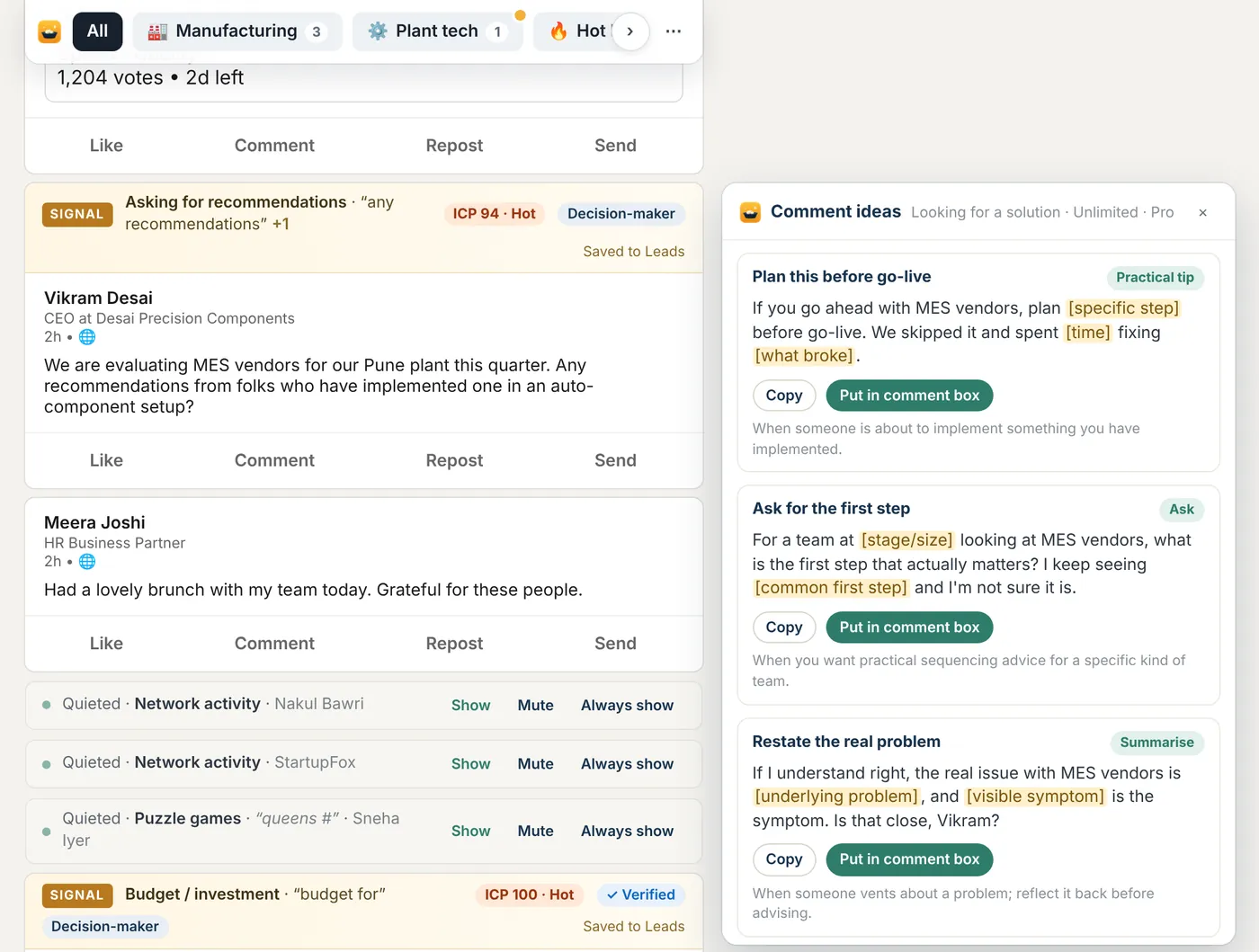
| Comment ideas | 3 posts a day | Every post, full framework library |
| Post Coach | Quick check | Full report |
| Who to engage today | Top 3 | Everyone |
| Market Pulse | Weekly summary | Full report |
| Saved-post library | 25 posts | Unlimited, send to Claude or NotebookLM |
| Team Playbook | — | Yes |
GoldPan for LinkedIn is a free Chrome extension by Amit Jadhav that makes the LinkedIn feed useful for work. It adds your own topic tabs above the feed, hides promoted posts, engagement bait and game invites, runs your #hashtag searches across all of LinkedIn, tags posts that show buying intent and scores every author against your ideal buyer. Everything runs on your device.
Yes. The free plan is free forever, with no account and no card: noise filters, topic packs, 3 feed tabs, signal tags, ideal-buyer scores, 5 All of LinkedIn searches a month, 5 saved leads a month and 20 Nuggets a month.
Pro is an optional one-time payment of ₹499 in India or $9 elsewhere, and every install gets Pro free for the first 7 days.
Add GoldPan to Chrome and open your LinkedIn feed. Promoted posts, suggested posts and “X likes this” or “X commented on this” spillover are quieted straight away. Each one folds into a slim line you can open with Show, or you can switch them off completely in the dashboard.
LinkedIn lets you unfollow or mute people, but it has no way to hide posts by word or topic. GoldPan adds both: mute any word or phrase, turn on topic packs such as engagement bait or politics, or make a tab that shows only the posts matching your words, #hashtags or people.
Make a GoldPan tab with the hashtags you care about, for example #MES and #OEE, then switch it to All of LinkedIn. GoldPan opens LinkedIn’s own post search for those hashtags, newest first, exactly as if you had typed it, then hides the noise and scores the results. The free plan includes 5 of these searches a month; Pro is unlimited.
No. GoldPan has no servers and no account system, and it sends nothing anywhere. There is no analytics or tracking. Your settings, tabs, leads and Nuggets are stored only on your device, and you can export or delete them from the dashboard at any time. The full privacy policy is linked at the bottom of this page.
GoldPan does not automate anything on your account. It never posts, likes, comments, follows, connects or messages for you, and it does not crawl LinkedIn in the background. It changes how the pages you open look on your own screen, and it only runs a LinkedIn search when you click All of LinkedIn. GoldPan is not made or endorsed by LinkedIn.
Pro removes every limit: unlimited tabs and All of LinkedIn searches, people and smart tabs, the Columns page, unlimited leads with CSV export, unlimited Nuggets with reminders and a morning brief, comment ideas on every post, the intent filter, Focus mode and Team Playbook.
It costs ₹499 in India (PayU) or $9 elsewhere (Stripe), paid once, with no subscription.
Buy Pro on this page. Your licence key is emailed to you within 12 hours. Open GoldPan’s dashboard, go to Pro, paste the key and click Activate. The key is checked offline on your device and works for life.
No. GoldPan is a Chrome extension, so it works on LinkedIn in Google Chrome on your computer: Windows, Mac, Linux or ChromeOS. It does not change the LinkedIn app on your phone.
GoldPan is made by Amit Jadhav, who builds AI tools for business professionals and teaches them in Our AI masterclass. Payments are processed by ModelCam Technologies, the company behind Amit Jadhav’s tools.
Yes. For a team or company of 5 or more people, email amit@amitjadhav.com for a bulk key pack. Pro’s Team Playbook lets the whole team load the same ideal buyer, tabs and rules.
Free forever. Pro free for your first 7 days. Everything stays on your device.